


Template calls to Blackboard
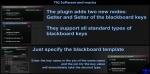
Instead of a variety of getters and setters of the blackboard keys, you can use only these 2 nodes.
- Supported Platforms
- Supported Engine Versions4.27, 5.0 - 5.2
- Download TypeEngine PluginThis product contains a code plugin, complete with pre-built binaries and all its source code that integrates with Unreal Engine, which can be installed to an engine version of your choice then enabled on a per-project basis.
Description
Reviews
Questions
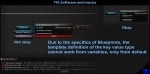
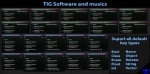
The plugin adds two nodes. With their help, you can no longer use the Set/GetValueAsInt/Float/Object etc variety. By the name of the key and the specified template, the pin of the key value will take the desired type
Documentation:
1. Create the necessary node, getter or setter of the key
2. Specify the blackboard template. It will be used to search for keys and determine their type. If the type does not match or the key was not found, check the correctness of the selected template.
The Template should correspond to the one in which requests will occur during the program/game, or at least be in the inheritance hierarchy and have the necessary part of similar keys
A BlackboardTemplate CANNOT BE a variable or a derivative of another node. Use ONLY the default pin value
3. Enter the name of the existing key. After entering, the value pin will take the required type.
If this does not happen, try compiling the bluprint. The log will show information about why the type could not be determined. For valid compilation, the node must participate in the logic, otherwise it will be skipped by the compiler. For the getter, you can make a PrintString, for the setter, it is enough to connect the input Exec pin
A KeyName CANNOT BE a variable or a derivative of another node. Use ONLY the default pin value
The key name is not case sensitive
Technical Details
Features:
- You do not need to specify the type of the blackboard key
- Information about changing the key name or type is updated in real time in all templates
- Any change of the keys in the blackboard provides a secure notification of the type/name change
Code Modules:
- TemplateCallsToBlackboard (UncookedOnly)
Number of Blueprint Nodes: 2
Network Replicated: No
Supported Development Platforms: Windows
Supported Target Build Platforms: Win64, Win32, Mac, Linux, IOS, Android
Documentation: Description of the product, its screenshots, in the editor node description (only in 5.1)